UGC Ads AI: TikTok App Creative Workflow
Use AI to create UGC-style TikTok app ads from demos, hooks, screenshots and organic tests before spending on paid ads.
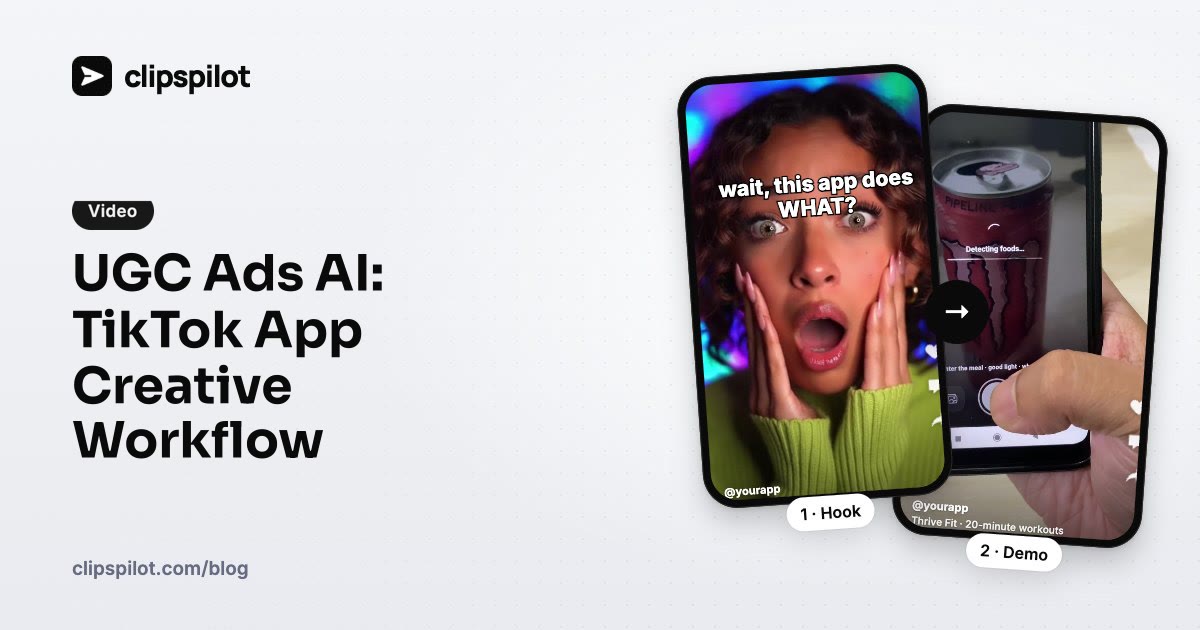
AI UGC ads for apps are UGC-style TikToks made faster with AI: AI helps write hooks, captions, scripts and variations, while your real app demo provides the proof. The practical workflow is simple: prepare demo assets, generate hook batches, post organic creative tests, then only put ad spend behind the versions that show install intent.
What "AI UGC ads" means for app marketers on TikTok
For app marketers, AI UGC ads are not just avatar videos. They are UGC-style creative made faster with AI: hook writing, caption writing, script variation, slideshow/listicle generation and repeated demo-based production.
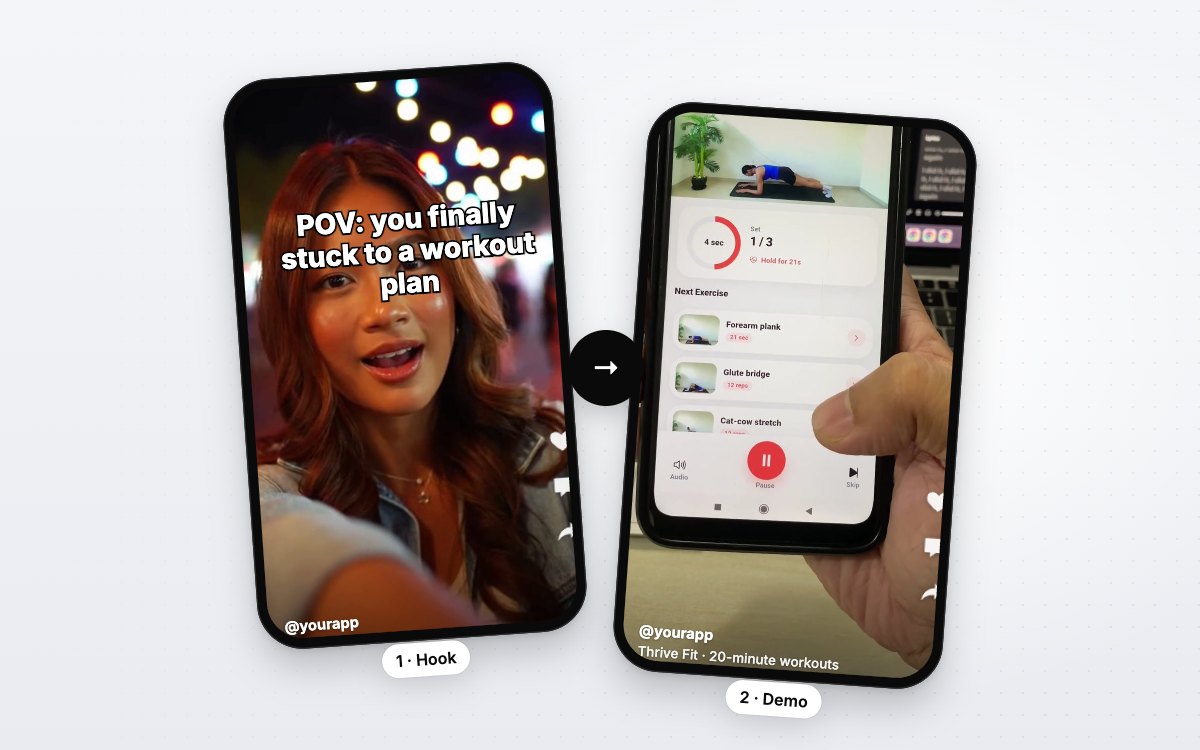
There are four different things people often mix together:
- Real creator testimonial: a real person shares their experience with your app.
- AI avatar content: a synthetic presenter reads a script.
- Organic TikTok content: posts made to test ideas, reach viewers and build demand.
- UGC-style app demo videos: direct, native-looking TikToks that show a problem, a product moment and an outcome.
For apps, the strongest TikTok UGC-style creatives usually do not look like polished brand ads. They show a real problem, a fast app demo and a believable outcome. Think less “commercial” and more “this fixed an annoying part of my day.”
ClipsPilot creates and posts TikTok content for app founders and marketers. It is TikTok-only, so think of it as a creation and posting layer for TikTok tests, not a paid ads manager.
Example 18-second UGC-style app creative script:
Hook text: “I stopped forgetting subscriptions with this.”
Scene 1, 0–3s: screen recording opens on messy bank transactions. Voice/caption: “If you keep getting surprised by renewals...”
Scene 2, 3–12s: demo app scanning subscriptions and showing renewal dates. Caption: “It finds recurring charges and reminds you before they renew.”
Scene 3, 12–18s: show clean dashboard. CTA caption: “I check this every Friday now.”
The 4 TikTok UGC-style formats that work best for apps
Most app teams only need four repeatable formats.
- Hook & Demo: a short hook first, then the app solving the problem. Use it for problem-solution selling. See the full breakdown of Hook & Demo videos.
- Caption-over-demo: your screen recording with one AI-written caption over it. Use it for simple feature education.
- Hook banner over demo: a banner appears above the demo and fades in/out. Use it when you want to test many hooks on the same recording.
- Listicle slideshow: a photo carousel with pain points, mistakes or tips. Use it for top-of-funnel education. For structure, read TikTok photo slideshows.
The “UGC” feeling comes from directness, specificity and believable user language. You do not need to film a person every day if the creative still feels native and useful.
These map cleanly to ClipsPilot Autopilots: Hook & Demo, Fade In/Out, Video + caption and Slideshow Autopilot using uploaded or found-for-you photo collections.
Format picker:
- If your app solves an urgent pain, use Hook & Demo: “This is how I stopped losing client notes.”
- If the app is visual, use Video + caption: “Plan a week of meals in 12 seconds.”
- If you have many hooks to test on one demo, use Fade In/Out: “POV: your invoices finally match your payments.”
- If you want top-of-funnel pain education, use Slideshow: “5 signs your budgeting app is lying to you.”
Build the raw asset kit before asking AI for creatives
AI works better when the inputs are concrete. Before you ask for scripts, prepare:
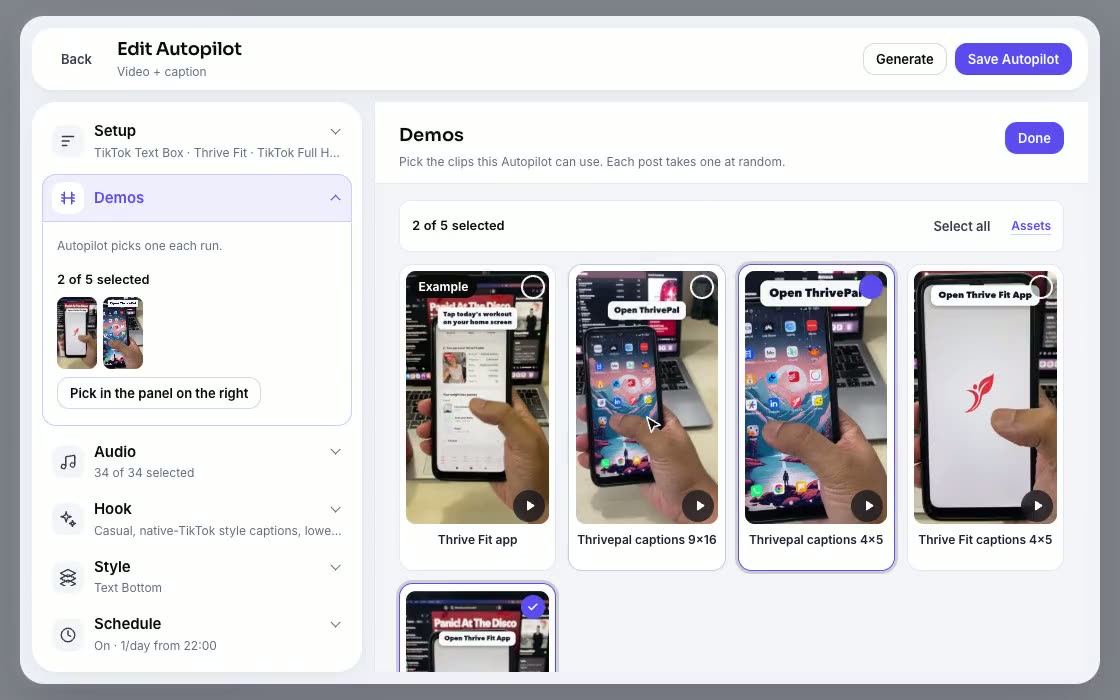
- 5–10 short demo recordings.
- 10 screenshots.
- 3–5 user pains.
- 3 outcomes.
- 3 objections.
Recording rules for TikTok app demos:
- Use vertical crop.
- Show one task per clip.
- Skip slow onboarding.
- Start near the useful moment.
- End on the result, not a menu.
For slideshow content, prepare photo collections: screenshots, lifestyle images, UI closeups, simple charts or relevant visual metaphors. Name files by use case so production stays organized: invoice_scan_12s, habit_streak_9s, meal_plan_calendar_15s.
Asset checklist for a calorie tracking app:
Demo clips: barcode scan, meal log, weekly macro chart, recipe import, progress screen.
Pain list: “I forget snacks”, “I hate typing meals”, “I don’t know if I’m over protein”, “weekends ruin my tracking”.
Outcomes: “log lunch in under 10 seconds”, “see protein gap before dinner”, “repeat saved meals”.
Objections: “tracking takes too long”, “calorie apps feel judgmental”, “I eat homemade food”.
Use AI to create hook batches, not one-off ad scripts
AI is most useful when it creates many angles around the same demo. Generate hooks by category: pain, curiosity, result, POV, objection, comparison, mistake and listicle.
Do not publish the first script it gives you. A better workflow:
- Generate 20–50 hooks.
- Pick the most specific 5–10.
- Attach those hooks to one or two demo clips.
- Post them as separate tests.
You can use the free TikTok hook generator at /tiktok-hook-generator with no signup. For more formulas, see 60 TikTok hook ideas for apps.
Write prompts that include the user, problem, feature and emotional angle.
Prompt and output example:
Prompt: “Write 20 TikTok hooks for a focus timer app used by ADHD students. The demo shows starting a 25-minute focus session, blocking distracting apps, and seeing a streak. Avoid generic productivity language.”
Hooks:
- “POV: you only study when your phone physically can’t distract you.”
- “This is the timer I use when my brain refuses to start.”
- “If Pomodoro never worked for you, try blocking the escape routes first.”
Caption example: “The trick is not more motivation. It is making distraction harder for the next 25 minutes.”
Turn one demo recording into a week of TikTok UGC-style creative tests
One feature can produce a full week of tests if you change the angle, not the whole video. Keep the demo mostly stable and rotate hooks, captions or format.
A good rule of thumb: test one variable at a time. Use the same demo with different hooks, or the same hook with different demo sections. Do not change hook, demo, caption and CTA all at once.
ClipsPilot Autopilots can be given hook directions, schedules, time zones and connected TikTok accounts. Posts can go live or be sent to TikTok drafts for review first. If you want the broader scheduling setup, read how to automate TikTok posting.
Illustrative 7-day test for a language learning app:
- Mon 9:00: Hook & Demo, pain hook: “I kept forgetting words after lessons.”
- Tue 12:30: Fade In/Out, curiosity hook: “The 10-second review trick I wish Duolingo had.”
- Wed 18:00: Video + caption, result hook: “I remembered 27/30 words after using this.”
- Thu 9:00: Slideshow, listicle: “5 reasons your vocab does not stick.”
- Fri 12:30: Hook & Demo, objection hook: “If flashcards feel boring, try this instead.”
- Sat 10:00: Video + caption, POV hook.
- Sun: review drafts/library and pick next week’s angles.
Score organic TikTok results before turning a creative into an ad
Organic TikTok can be a useful creative signal before paid spend. It is not a guarantee that the same creative will work as an ad, but it helps you avoid betting on guesses.
Use an app-focused scorecard:
- Thumb-stop strength.
- Demo clarity.
- Comments showing intent.
- Profile visits.
- Link clicks.
- Installs.
- Activated users, where tracking is available.
Do not choose winners only by views. A lower-view post with comments like “what app is this?” or “is this on iOS?” may be more valuable than a viral post with joke comments. For the install path, see how to get app downloads from TikTok without ads.
Use your generated library and posts list to review what was made and posted. Look for angles that create buyer questions, not just watch time.
Illustrative scorecard:
Creative A: 8,400 views, 31 profile visits, 9 link clicks, 2 trials, comments mostly jokes.
Creative B: 3,100 views, 44 profile visits, 18 link clicks, 6 trials, comments: “does it sync with Notion?” and “Android?”
Winner for ad testing: Creative B, because install intent is stronger even though views are lower.
Quality control: make AI UGC creatives feel specific, not fake
Weak AI UGC has obvious signs:
- Vague claims.
- No visible product moment.
- Overhyped captions.
- Unreadable text.
- Hooks that could apply to any app.
Before publishing, check the TikTok on a phone. Can the viewer understand the problem in 2 seconds? Can they see the app by second 5? Can they understand the outcome without sound?
Send posts to TikTok drafts first when testing a new format, a brand-sensitive claim or an unclear demo sequence. Keep variation high without becoming random: rotate pain points, user personas, outcomes and objections while keeping the same core app promise.
Pre-publish QA checklist:
- Hook names a specific user or pain: yes/no.
- App screen appears by second 5: yes/no.
- Text is readable on a phone: yes/no.
- Caption explains one outcome, not five: yes/no.
- No unsupported claim like “guaranteed to save money”: yes/no.
- CTA is soft and TikTok-native: yes/no.
If two or more are “no”, send to drafts and revise before posting.
Where ClipsPilot fits in an AI UGC TikTok workflow
ClipsPilot fits as the TikTok creation and posting layer for app founders and marketers who already have demo recordings, screenshots or photo collections.
The four Autopilot options are:
- Slideshow Autopilot: AI writes a listicle-style photo carousel every run using your photo collections, from your uploads or found for you, with readable text styles.
- Hook & Demo: a short hook clip with on-screen hook text, followed by your app demo recording.
- Fade In/Out: a hook banner above your demo video that fades in and out.
- Video + caption: your demo clip with an AI-written caption over it.
Operationally, there is a content calendar, posts list, bulk scheduling, generated library, multiple TikTok accounts, live publishing and TikTok drafts. Plan choice depends on testing volume; see /pricing for current plan details.
Plan fit example:
Solo founder testing one app: Pro at $19/month gives 100 shared slideshow + video posts and 5 Autopilots, enough for several weekly TikTok creative tests.
Growth at $39/month gives 300 posts and 20 Autopilots for more angles or multiple personas.
Agency at $149/month gives 2,000 posts and unlimited Autopilots for teams running several TikTok accounts.
Use drafts first for new claims or new demo flows; use live posting for proven recurring formats.
FAQ
What are AI UGC ads?
AI UGC ads are UGC-style creatives made faster with AI. For apps, that usually means AI-written hooks, captions, scripts and slides built around real demo recordings or screenshots.
Can AI make UGC ads for a mobile app without filming a creator?
Yes. You can use app screen recordings, screenshots, captions, hook banners and slideshow carousels. The creative can still feel UGC-style if the language is specific and the demo shows a believable user outcome.
What is the best TikTok UGC ad format for an app?
Hook & Demo is usually the strongest starting point because it pairs a fast pain or outcome hook with visible product proof. Caption-over-demo and listicle slideshows are useful for simpler education and top-of-funnel angles.
Should I test UGC creatives organically before running paid ads?
Yes, when possible. Organic results are not a guaranteed ad forecast, but they help you find hooks, demos and pain points that create profile visits, link clicks, install questions and trials before you spend.
What makes an AI-generated UGC ad feel fake?
It feels fake when the claim is vague, the app barely appears, the hook could fit any product, the caption overpromises or the viewer cannot understand the outcome without extra explanation.